

Stores

For Your Search

The default method of payment for your lease agreement is Autopay with the credit card used to set up your account.

You can add additional credit cards by contacting our customer service team.

  1. Gather detailed information by asking probing questions about why the customer believes this is a fraudulent account.
    1. Confirm customers Email and physical address.


Probing Questions:

    • Has anyone in your household recently received or purchased tires/rims?
    • Have the tires has been delivered to your address?
    • Have you received a tracking email?
    • Do you know (address on file)?


    1. Add an alert within Loan Pro. (NO NOT ADD NOTE TO LOANPRO)


    1. Send email to the customer.

Escalate to the CX Managers Queue 

Note: If the account is confirmed as fraudulent, OLI covers the shipping expenses.


If the customer reaches out using a phone number or email not associated with the claimed fraud account, kindly request their name to help locate their account, and make sure to document this account and the ongoing interaction with the customer.


Dear Customer,

We understand that identity-related concerns can be distressing, and we are committed to assisting you through the resolution process. If you believe you are a victim of identity theft, please follow these steps to initiate a dispute:

Contact the Police Department: Report the identity theft to your local police department as soon as possible. Obtain a copy of the police report for our records.

Submit a Report on IdentityTheft.gov: Visit IdentityTheft.gov to file a detailed identity theft report. Provide us with the report generated through this process.

Submit Documentation: Attach a copy of your valid identification (e.g., driver’s license, passport). Provide proof of your current address (acceptable documents include utility bills, bank statements, etc.).

Email All Information and Documents: Send the required information and documents to fraud@own.lease.

By adhering to these steps, you help us expedite the resolution process and ensure the security of your account. Please rest assured that all provided information will be treated with the utmost confidentiality. If you have any questions or need further assistance, feel free to contact our dedicated fraud resolution team at Fraud@own.lease.

Thank you for your prompt attention to this matter. We appreciate your cooperation as we work to address and resolve any concerns related to identity theft.

Sincerely,

Own.Lease


  • Frequency Change – Bi-Weekly/ Semi-Monthly/Monthly Payment Request
  • Refund – This escalation should be vetted by Thia Dixon
  • Cancel Lease
  • Return Tires
  • Fraud Claims
  • Deceased Escalation
  • Bankruptcy Escalation
  • Partial Payments on accounts 20+ days past due


Once the escalation is completed it must be assigned over to the CX Managers Team and Manager Escalation Queue


Notes Template

Contact Type: Inbound / Outbound

Reason for Interaction:

Action Taken/Resolution:

Escalation Completed: Yes / NA

Agent Signature:


Escalation to Manager Escalation Queue

Customer Name:

Lease Number:

Reason for Escalation: 

Action Taken: 

Agent Signature:


Fraud Escalation Template 


FRAUD CLAIM

Customer’s Comments:

Action Taken: Advise customer an escalation will be done, and he/she will be contacted within 48hrs.

Agent Signature:


Frequency Change Escalation Template

Customer Name:

Lease Number:

Requested Frequency:

Effective Date:

Amount Quoted:

Agent Signature:


Cancel/Return Escalation Template 

Customer Name:

Lease Number:

Cancel Date/ Return Date:

Agent Signature:


Waive Late Fee/Refund Escalation Template

Customer Name:

Lease Number:

Amount Requested:

Reason:

Agents Signature:


Deceased Escalation Template

Customer Name:

Lease Number:

Date of Death:

Location of Death: (City, State and County)

Executor/Attorney of estate: (Name, Address, and Phone Number)

Spoke To: (Name, Address, Phone Number, and Relationship to the Account Holder)

Agent Signature:


Bankruptcy Escalation Template

Customer Name:

Lease Number:

Attorney’s Name:

Attorney’s Phone Number:

What chapter of bankruptcy filed:  (Straight Bankruptcy is a Chapter 7, Wage Earners Plan is a Chapter 13)

Case Number:

Claim Date: (If there is not a case number, it is considered pending)

Agent Signature:


Inbound Text/Chat/Email Template 

Thank you for contacting Own.Lease. My name is [Agent’s Name] and ill be happy to assist you today. For verification purposes can you confirm your Telephone Number on file please.


Declined Payments         (To be sent if a manual payment is attempted and was declined)

Subject: Your Own Lease Account

Hello Customer,

Please reach out to your financial institution and confirm that Own.Lease is not blocked from charging your card. Also inform your financial institution that payments will be reoccurring to avoid same errors in the future.

The payment may reflect as own.lease or authorize.net

Regards,

Own.Lease


N.B – All escalations created must be titled accordingly in Kustomer and general notations should be title “Notes”
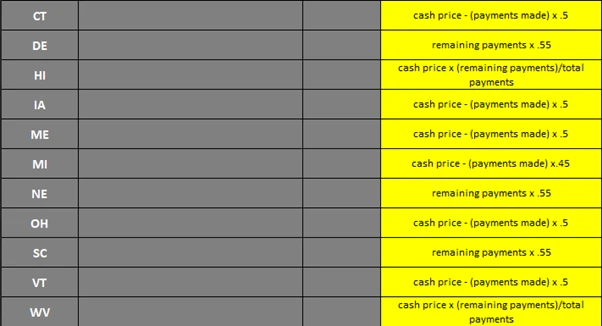
All other states get 25% off.

At this time, we do not provide credit reporting services.

Yes, unless you have already applied through Own.Lease within the past 30 days. When you apply for a product, Own.Lease may check your credit using a hard credit inquiry (also known as a “hard credit pull”), which may influence your credit score. A hard inquiry occurs when a company with whom you have applied for reviews your credit report, history of applying for credit, payment history, and your credit score as part of their decision-making process.

Yes, our customer service team can assist in Spanish. 1-855-447-4921.
Sí, nuestro equipo de atención al cliente puede ayudarle. 1-855-447-4921.

DO NOT CHANGE ADDRESS ON FILE

If a customer reaches out to us to make changes to their lease address post-creation, kindly ask for the new address they wish to use and then forward this request to Antonio for further assistance.

Also advise the customer that a Tire Agent representative will reach out to them.

Addresses on NEW Leases should not be changed. However, if the product is delivered and the customer has already started to make payments on the account then the address can be updated by an Agent otherwise it MUST be escalated.


Common Call Center Questions/Answers


Question: Why does it say my payout is more than price I paid for?

Answer: This is for the full-term price if you were to pay each week of your term.


Question: What is the return policy for tires I have never installed?

Answer: Contact Tire Agent and request tires to be sent back. Tire Agent will send return labels and customer would be responsible to pay for the return.  Once return has been confirmed with no issues to the product, account will be de-activated.


Question: I can’t log into my account. I tried resetting my password.

Answer: Try restarting phone or computer. Agent can create a temporary password for customer.


Question: I’m stuck at the DocuSign process, what do I do?

Answer: Common problem is the type of credit card the customer is using.  Debit linked to a bank account is the only card accepted during the application process.  Can be changed once application has been fully funded.


Question: How do I set up my account to bi-weekly, semi-monthly or monthly?

Answer: For now, that can only be done by us, how would you like us to set up your account going forward?


Question: Can I pay with a check or money order?

Answer: Right now, only a credit/card can be accepted with Own.Lease.  Your account will automatically be setup with auto-pay base on how your account is set up whether weekly, bi-weekly, semi-monthly or monthly.


Question: Why is my card being declined?

Answer: In most cases, your bank is blocking us as it’s not recognizing our new business.  Please call your bank and let them know that this will be a reoccurring transaction and remove the block.


Question: I picked Monthly/Biweekly option, why are you charging me twice?

Answer: All accounts are set for weekly payments when set up. We can assist with changing your cycle due if needed.


Question: Why does my account balance higher than the purchase when I log in to pay or get emails?

Answer: Those forms only show full buy out.  These are all payments for full term. They would refer to lease agreement or ask us for details. The system unfortunately can’t display this information. Doe’s not display Early buyout or 101-day option. 


Question: Where are my tires?

Answer: Tire Agent should have sent you a FedEx tracking number showing your delivery date/time.  If you haven’t received your tracking number, please call Tire Agent at 833-847-3463.


Question: How do I login to my account?

Answer: You should’ve received a Welcome Letter (check spam) with instructions on how to set up your account.  If not, go to https:/own.lease/ and login using your password used to open your account. If you’ve forgotten your password, click on the “forgot password”.


Question: Can I change my pay cycle online?

Answer: Unfortunately, at this point, no. But this something that we would happy to assist you with.


Question: Where do I make my payments online?

Answer: Go to https://own.lease/ and login, then click on “lease to make payment on” and then “make payment”.


Question: I filed for bankruptcy.  Or, I’m filing for bankruptcy.

Answer: I understand, is it possible for us to get your lawyer’s information so that we may verify and adjust your account accordingly?


Question: My tires have never been delivered.

Answer: You must notify Tire Agent immediately.  Once they confirm that the product hasn’t been delivered, they will notify us for cancellation.


Question: I need some tires/rims, what do I need to do?

Answer: You will need to visit TireAgent.com, pick out your product and we’d love your business, so pick Own.Lease to fund your purchase.


Question: Tire Agent calls. Do they have an active account? 

Answer: You would need to email charles@own.lease who can assist in your questions.


Question: I do not understand why own lease is trying to pull a payment when there is not a payment due yet.  

Answer: Sorry for the inconvenience, most likely your auto-pay didn’t move to the next due date. We can help you with that today.

FAQs

For Your Search

How can I add or change my payment method?

The default method of payment for your lease agreement is Autopay with the credit card used to set up your

View Article

Fraud Account

Gather detailed information by asking probing questions about why the customer believes this is a fraudulent account. Confirm customers Email

View Article

Escalations that should be sent to the Manager Escalation Queue

Frequency Change – Bi-Weekly/ Semi-Monthly/Monthly Payment Request Refund – This escalation should be vetted by Thia Dixon Cancel Lease Return

View Article

Escalation Templates

Notes Template Contact Type: Inbound / Outbound Reason for Interaction: Action Taken/Resolution: Escalation Completed: Yes / NA Agent Signature:  

View Article

Early Payoff Discount by State

All other states get 25% off.

View Article

Does Own.lease report my paid in full account to credit bureaus?

At this time, we do not provide credit reporting services.

View Article

Does Own.lease check credit?

Yes, unless you have already applied through Own.Lease within the past 30 days. When you apply for a product, Own.Lease

View Article

Do you have customer service assistance in Spanish?

Yes, our customer service team can assist in Spanish. 1-855-447-4921. Sí, nuestro equipo de atención al cliente puede ayudarle. 1-855-447-4921.

View Article

Customer request to Change Address on file

DO NOT CHANGE ADDRESS ON FILE If a customer reaches out to us to make changes to their lease address

View Article

Customer FAQs

Common Call Center Questions/Answers   Question: Why does it say my payout is more than price I paid for? Answer:

View Article

Scroll to Top