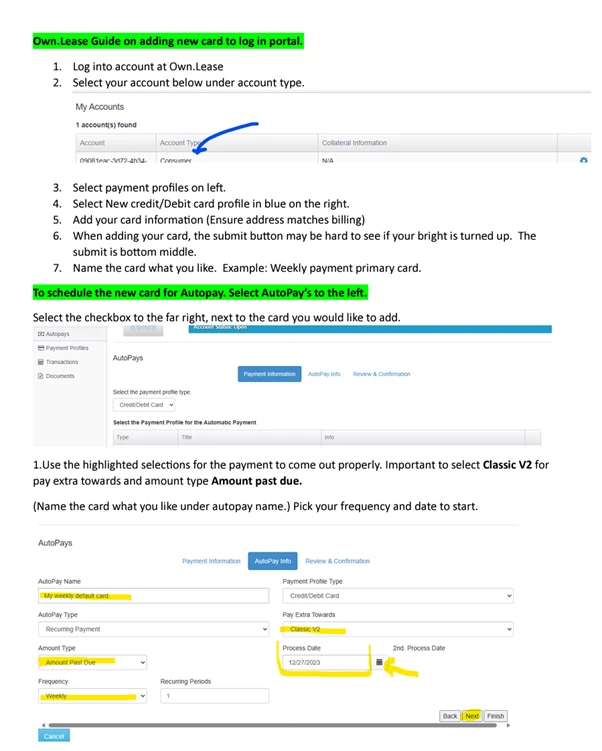
In order to add or update a payment card for AutoPay, users are required to log in to their portal.
— Compliance Note —
Updated for lease-to-own compliance and portal-first servicing.
You can Login to your account to view all of your account information including due date, payments made and your card on file.
We understand that unexpected situations come up and may prevent you from continuing to lease-to-own your merchandise. Please feel free to call customer service team to discuss your options. You can always terminate a Lease-to-own agreement by returning the property.
Contact Own.lease right away, our customer service team will do their best to find a payment option that works for you. Or you can terminate the agreement at any time by returning the leased item. We also have direct text available. 866-875-3366
Login to your account to verify we are using the correct card for auto payment.
Call customer service to update your credit card or expiration date.
Click here to Login to your account at Own.lease to see how many payments you have made and how many payments are remaining.
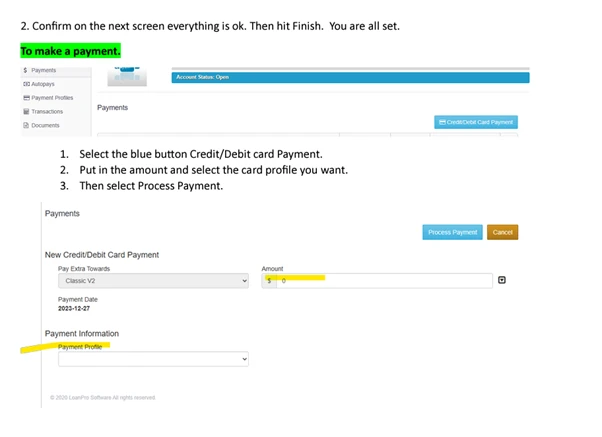
All accounts are initially set up on auto pay. For additional payment options such as adding or updating your card on file, as well as making single payments. visit/clickPayment Portal.
Your log-in information is sent in a welcome letter, which may go to your spam folder if not recognized. For further assistance, reach out to the customer service team.
You can pay your lease agreement in full at any time by calling our customer service team.
Follow the instructions to add or change the credit card on your account.
The default method of payment for your lease agreement is Autopay with the credit card used to set up your account.

 EN
EN  ES
ES