
Stores

For Your Search

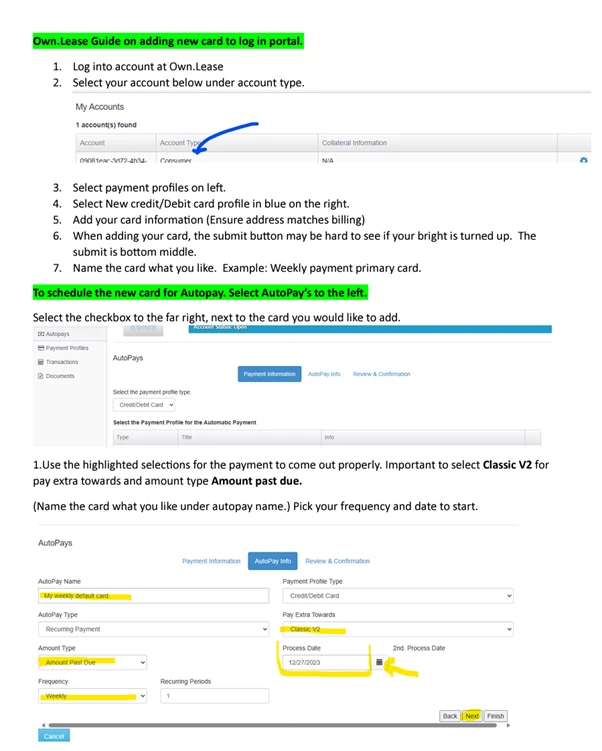
Follow the instructions to add or change the credit card on your account.
We are currently with vendors listed on our website Own.lease , once you are at checkout please select Own.Lease as they payment option  and there you can apply.

Own.Lease is committed to providing the best possible service to every one of our customers. If you are dissatisfied with any aspect of your experience, Own.Lease is here to listen and ensure exceptional customer service moving forward. We welcome feedback. Complaints help bring opportunities for improvement to our attention. Own.Lease ensures that complaints are dealt with effectively and are taken seriously.

Own.Lease responsibility will be to:

  • Acknowledge every complaint in a timely manner.
  • Learn from the complaint and use it to improve our service.

The complainant’s responsibility is to:

  • Explain the matter as clearly and as fully as possible, including any action taken to date.
  • Allow Own.Lease a reasonable time to deal with the matter.
  • Tell us what you would like the outcome of the complaint to be if you can. Please understand some matters may be beyond Own.Lease’s control.


You can contact us by telephone, email, or in writing.

Own.Lease
1207 Delaware Ave Ste 190, Wilmington, DE, 19806

General Customer Service:855-447-4921
Email: Support@own.lease

There are four ways to contact us: Phone, Text, Chat, or email. Contact our customer service team.

The default method of payment for your lease agreement is Autopay with the credit card used to set up your account.

You can add additional credit cards by contacting our customer service team.

  1. Gather detailed information by asking probing questions about why the customer believes this is a fraudulent account.
    1. Confirm customers Email and physical address.


Probing Questions:

    • Has anyone in your household recently received or purchased tires/rims?
    • Have the tires has been delivered to your address?
    • Have you received a tracking email?
    • Do you know (address on file)?


    1. Add an alert within Loan Pro. (NO NOT ADD NOTE TO LOANPRO)


    1. Send email to the customer.

Escalate to the CX Managers Queue 

Note: If the account is confirmed as fraudulent, OLI covers the shipping expenses.


If the customer reaches out using a phone number or email not associated with the claimed fraud account, kindly request their name to help locate their account, and make sure to document this account and the ongoing interaction with the customer.


Dear Customer,

We understand that identity-related concerns can be distressing, and we are committed to assisting you through the resolution process. If you believe you are a victim of identity theft, please follow these steps to initiate a dispute:

Contact the Police Department: Report the identity theft to your local police department as soon as possible. Obtain a copy of the police report for our records.

Submit a Report on IdentityTheft.gov: Visit IdentityTheft.gov to file a detailed identity theft report. Provide us with the report generated through this process.

Submit Documentation: Attach a copy of your valid identification (e.g., driver’s license, passport). Provide proof of your current address (acceptable documents include utility bills, bank statements, etc.).

Email All Information and Documents: Send the required information and documents to fraud@own.lease.

By adhering to these steps, you help us expedite the resolution process and ensure the security of your account. Please rest assured that all provided information will be treated with the utmost confidentiality. If you have any questions or need further assistance, feel free to contact our dedicated fraud resolution team at Fraud@own.lease.

Thank you for your prompt attention to this matter. We appreciate your cooperation as we work to address and resolve any concerns related to identity theft.

Sincerely,

Own.Lease


  • Frequency Change – Bi-Weekly/ Semi-Monthly/Monthly Payment Request
  • Refund – This escalation should be vetted by Thia Dixon
  • Cancel Lease
  • Return Tires
  • Fraud Claims
  • Deceased Escalation
  • Bankruptcy Escalation
  • Partial Payments on accounts 20+ days past due


Once the escalation is completed it must be assigned over to the CX Managers Team and Manager Escalation Queue


Notes Template

Contact Type: Inbound / Outbound

Reason for Interaction:

Action Taken/Resolution:

Escalation Completed: Yes / NA

Agent Signature:


Escalation to Manager Escalation Queue

Customer Name:

Lease Number:

Reason for Escalation: 

Action Taken: 

Agent Signature:


Fraud Escalation Template 


FRAUD CLAIM

Customer’s Comments:

Action Taken: Advise customer an escalation will be done, and he/she will be contacted within 48hrs.

Agent Signature:


Frequency Change Escalation Template

Customer Name:

Lease Number:

Requested Frequency:

Effective Date:

Amount Quoted:

Agent Signature:


Cancel/Return Escalation Template 

Customer Name:

Lease Number:

Cancel Date/ Return Date:

Agent Signature:


Waive Late Fee/Refund Escalation Template

Customer Name:

Lease Number:

Amount Requested:

Reason:

Agents Signature:


Deceased Escalation Template

Customer Name:

Lease Number:

Date of Death:

Location of Death: (City, State and County)

Executor/Attorney of estate: (Name, Address, and Phone Number)

Spoke To: (Name, Address, Phone Number, and Relationship to the Account Holder)

Agent Signature:


Bankruptcy Escalation Template

Customer Name:

Lease Number:

Attorney’s Name:

Attorney’s Phone Number:

What chapter of bankruptcy filed:  (Straight Bankruptcy is a Chapter 7, Wage Earners Plan is a Chapter 13)

Case Number:

Claim Date: (If there is not a case number, it is considered pending)

Agent Signature:


Inbound Text/Chat/Email Template 

Thank you for contacting Own.Lease. My name is [Agent’s Name] and ill be happy to assist you today. For verification purposes can you confirm your Telephone Number on file please.


Declined Payments         (To be sent if a manual payment is attempted and was declined)

Subject: Your Own Lease Account

Hello Customer,

Please reach out to your financial institution and confirm that Own.Lease is not blocked from charging your card. Also inform your financial institution that payments will be reoccurring to avoid same errors in the future.

The payment may reflect as own.lease or authorize.net

Regards,

Own.Lease


N.B – All escalations created must be titled accordingly in Kustomer and general notations should be title “Notes”

FAQs

For Your Search

How do I change or add credit card to my account?

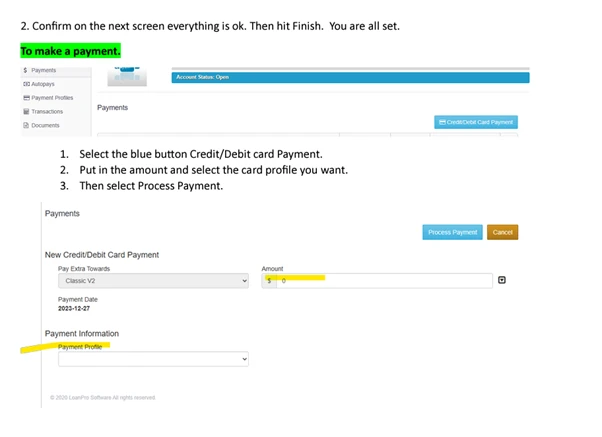
Follow the instructions to add or change the credit card on your account.
View Article

How do I apply for a lease with your company?

We are currently with vendors listed on our website Own.lease , once you are at checkout please select Own.Lease as

View Article

How can I give feedback or file a complaint with Own.Lease?

Own.Lease is committed to providing the best possible service to every one of our customers. If you are dissatisfied with

View Article

How can I contact Own.Lease?

There are four ways to contact us: Phone, Text, Chat, or email. Contact our customer service team.

View Article

How can I add or change my payment method?

The default method of payment for your lease agreement is Autopay with the credit card used to set up your

View Article

Fraud Account

Gather detailed information by asking probing questions about why the customer believes this is a fraudulent account. Confirm customers Email

View Article

Escalations that should be sent to the Manager Escalation Queue

Frequency Change – Bi-Weekly/ Semi-Monthly/Monthly Payment Request Refund – This escalation should be vetted by Thia Dixon Cancel Lease Return

View Article

Escalation Templates

Notes Template Contact Type: Inbound / Outbound Reason for Interaction: Action Taken/Resolution: Escalation Completed: Yes / NA Agent Signature:  

View Article

Scroll to Top