Stores

For Your Search

Check with the store you purchased your merchandise for any warranty available.

Please contact our call center if payment arrangements are needed.

NB All sentences written in RED must be read verbatim.

[Agent]: Thank you for contacting Own Lease. This call may be monitored or recorded for quality assurance purposes. My name is [Agent Name]. Who do I have the pleasure of speaking with?

[Agent]: Hi (Customer Name). I would be happy to assist you. Can you confirm the email address on file? 

[Pause for Customer Verification]     

[Agent] Thank you for providing that information. How can I assist you today?

[Pause for Customer Concern]

[Agent] Use empathy statement if needed. 

[Payment Disclosure] “OK [Customer Name], I have your permission to run the card ending in (last 4) for ($$$), is that correct?

[Agent] “Thank you for your payment.”

“Was there something in the way your account was set up that caused this delinquency?” 

[Listen to the customer’s concern and provide assistance accordingly.]

[Agent Confirm Account Details]

(Customer Name). I’d like to confirm your account details.

As per my records, your current payment cycle is set to (….) and your due date is D/M. Does this match your pay cycle?

Additionally, could you please verify the last four digits of the card designated for your autopayments?

[Agent Recap] Please note your next due date is D/M for $

[Agent Recap] Was there anything else I could do for you today?

 [Agent] Thank you for choosing Own Lease.  Have a great day!

If you need to cancel a recent order, please contact the vendor directly and follow their instructions to complete the cancellation.

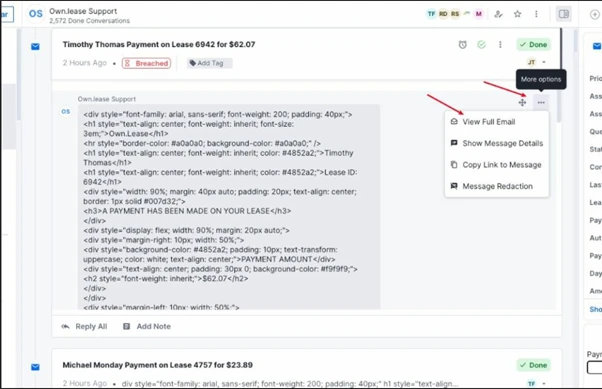
Kustomer will not display any HTML formatting in the conversation. If you need to view it in its original format, then they can open the full email from the message options menu.

Website: http://electrofinance.com

Email:  support@electrofinance.com

Phone: (800) 339-8512

Step 1. Create escalation using the relevant template. (Templates are in Snippets and KB Article titled Escalation Templates)

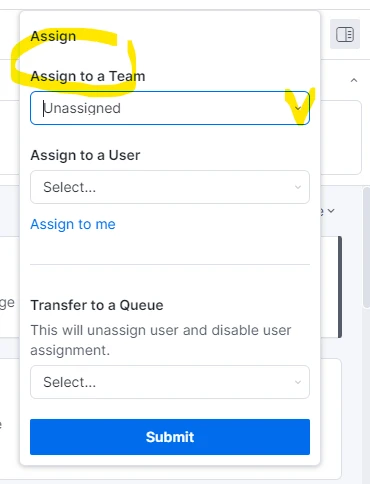
Step 2. Assign Team – This should be CX Managers


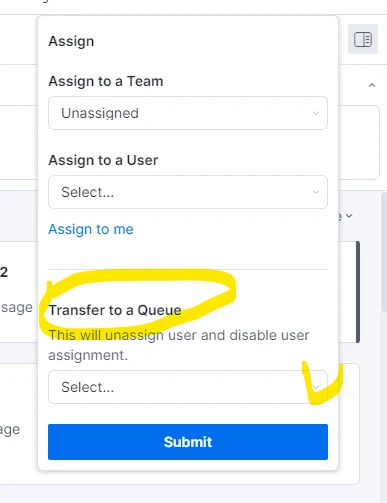
Step 3. Assign Queue – This should be Managers Escalation Queue

Step 4. SAVE CHANGES BY SELECTING SUBMIT

Notations on the account should be detailed and relevant


Your approval is generally good for 45 days, but please refer to your specific approval terms.

Approvals may be valid for up to 90 days. Please refer to your specific approval terms.

FAQs

For Your Search

Is there a warranty on my merchandise?

Check with the store you purchased your merchandise for any warranty available.

View Article

Is there a grace period for late payments?

Please contact our call center if payment arrangements are needed.

View Article

Inbound Call Script

NB All sentences written in RED must be read verbatim. [Agent]: Thank you for contacting Own Lease. This call may

View Article

I need to cancel my recent agreement

If you need to cancel a recent order, please contact the vendor directly and follow their instructions to complete the

View Article

How to view Encrypted Email

Kustomer will not display any HTML formatting in the conversation. If you need to view it in its original format,

View Article

How to contact Electro Finance

Website: http://electrofinance.com Email: support@electrofinance.com Phone: (800) 339-8512

View Article

How to complete an escalation in Kustomer

Step 1. Create escalation using the relevant template. (Templates are in Snippets and KB Article titled Escalation Templates) Step 2.

View Article

How long until my approval expires?

Your approval is generally good for 45 days, but please refer to your specific approval terms.

View Article

How long are customer approvals good for?

Approvals may be valid for up to 90 days. Please refer to your specific approval terms.

View Article

Scroll to Top