

Siga las instrucciones para agregar o cambiar la tarjeta de crédito en su cuenta.
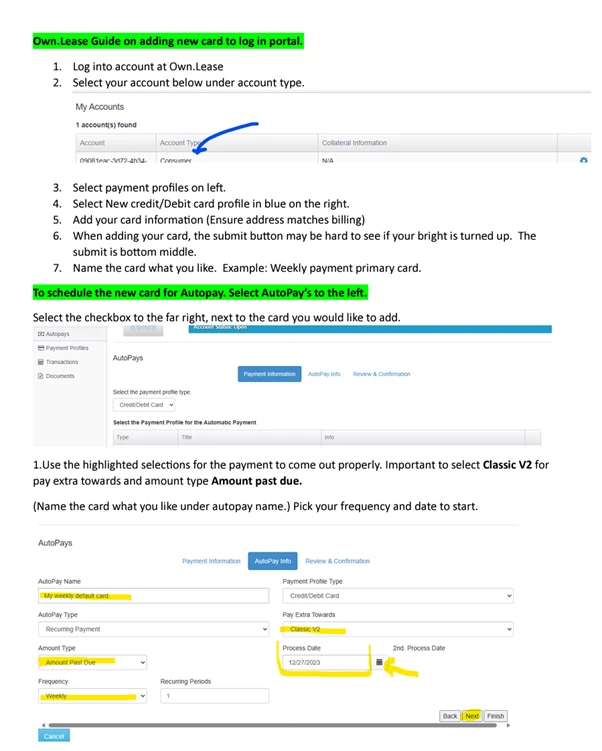

Siga las instrucciones para agregar o cambiar la tarjeta de crédito en su cuenta.
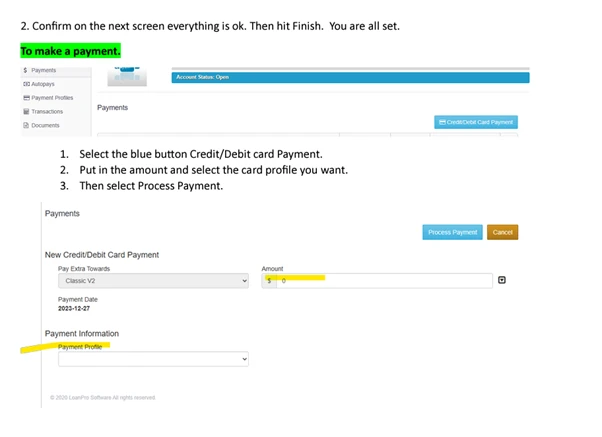

Actualmente contamos con proveedores listados en nuestro sitio web Own.lease, una vez que esté en el momento del pago, seleccione Own.Lease como opción de pago y allí podrá presentar la solicitud.
Contacta con nuestro equipo de atención al cliente.
Puede acceder a su documento de arrendamiento iniciando sesión en su cuenta haciendo clic aquí Acceder enlace en la página de inicio de Own.lease. Utilice la información de inicio de sesión proporcionada en su carta de bienvenida (revise el correo no deseado si no la ve). En el portal, encontrará una opción denominada "Documentos", donde puede ver e imprimir su contrato de arrendamiento.
El acceso al portal de nuevas cuentas suele estar activo en 48 horas. Todos los documentos se envían al correo electrónico proporcionado al firmar el contrato de arrendamiento.
Own.Lease se compromete a brindar el mejor servicio posible a cada uno de nuestros clientes. Si no está satisfecho con algún aspecto de su experiencia, Own.Lease está aquí para escucharle y garantizarle un servicio al cliente excepcional de ahora en adelante. Agradecemos sus comentarios. Las quejas nos ayudan a identificar oportunidades de mejora. Own.Lease garantiza que las quejas se gestionen con eficacia y se tomen en serio.
La responsabilidad del Own.Lease será:
La responsabilidad del denunciante es:
Puede ponerse en contacto con nosotros por teléfono, correo electrónico o por escrito.
Own.Lease
1207 Delaware Ave Ste 190, Wilmington, DE, 19806
Servicio General al Cliente: 855-447-4921
Correo electrónico: Support@own.lease
Hay cuatro formas de contactarnos: teléfono, mensaje de texto, chat o correo electrónico. Comuníquese con nuestro equipo de atención al cliente.
El método de pago predeterminado para su contrato de arrendamiento es Pago automático con la tarjeta de crédito utilizada para configurar su cuenta.
Puede agregar tarjetas de crédito adicionales comunicándose con nuestro equipo de atención al cliente.
Preguntas de Sondeo:
Escalate to the CX Managers Queue
Note: If the account is confirmed as fraudulent, OLI covers the shipping expenses.
If the customer reaches out using a phone number or email not associated with the claimed fraud account, kindly request their name to help locate their account, and make sure to document this account and the ongoing interaction with the customer.
Dear Customer,
We understand that identity-related concerns can be distressing, and we are committed to assisting you through the resolution process. If you believe you are a victim of identity theft, please follow these steps to initiate a dispute:
Contact the Police Department: Report the identity theft to your local police department as soon as possible. Obtain a copy of the police report for our records.
Submit a Report on IdentityTheft.gov: Visit IdentityTheft.gov to file a detailed identity theft report. Provide us with the report generated through this process.
Submit Documentation: Attach a copy of your valid identification (e.g., driver’s license, passport). Provide proof of your current address (acceptable documents include utility bills, bank statements, etc.).
Email All Information and Documents: Send the required information and documents to fraud@own.lease.
By adhering to these steps, you help us expedite the resolution process and ensure the security of your account. Please rest assured that all provided information will be treated with the utmost confidentiality. If you have any questions or need further assistance, feel free to contact our dedicated fraud resolution team at Fraud@own.lease.
Thank you for your prompt attention to this matter. We appreciate your cooperation as we work to address and resolve any concerns related to identity theft.
Sincerely,
Own.Lease
Once the escalation is completed it must be assigned over to the CX Managers Team and Manager Escalation Queue
Notes Template
Contact Type: Inbound / Outbound
Reason for Interaction:
Action Taken/Resolution:
Escalation Completed: Yes / NA
Agent Signature:
Escalation to Manager Escalation Queue
Customer Name:
Lease Number:
Reason for Escalation:
Action Taken:
Agent Signature:
Fraud Escalation Template
FRAUD CLAIM
Customer’s Comments:
Action Taken: Advise customer an escalation will be done, and he/she will be contacted within 48hrs.
Agent Signature:
Frequency Change Escalation Template
Customer Name:
Lease Number:
Requested Frequency:
Effective Date:
Amount Quoted:
Agent Signature:
Cancel/Return Escalation Template
Customer Name:
Lease Number:
Cancel Date/ Return Date:
Agent Signature:
Waive Late Fee/Refund Escalation Template
Customer Name:
Lease Number:
Amount Requested:
Reason:
Agents Signature:
Deceased Escalation Template
Customer Name:
Lease Number:
Date of Death:
Location of Death: (City, State and County)
Executor/Attorney of estate: (Name, Address, and Phone Number)
Spoke To: (Name, Address, Phone Number, and Relationship to the Account Holder)
Agent Signature:
Bankruptcy Escalation Template
Customer Name:
Lease Number:
Attorney’s Name:
Attorney’s Phone Number:
What chapter of bankruptcy filed: (Straight Bankruptcy is a Chapter 7, Wage Earners Plan is a Chapter 13)
Case Number:
Claim Date: (If there is not a case number, it is considered pending)
Agent Signature:
Inbound Text/Chat/Email Template
Thank you for contacting Own.Lease. My name is [Agent’s Name] and ill be happy to assist you today. For verification purposes can you confirm your Telephone Number on file please.
Declined Payments (To be sent if a manual payment is attempted and was declined)
Subject: Your Own Lease Account
Hello Customer,
Please reach out to your financial institution and confirm that Own.Lease is not blocked from charging your card. Also inform your financial institution that payments will be reoccurring to avoid same errors in the future.
The payment may reflect as own.lease or authorize.net
Regards,
Own.Lease
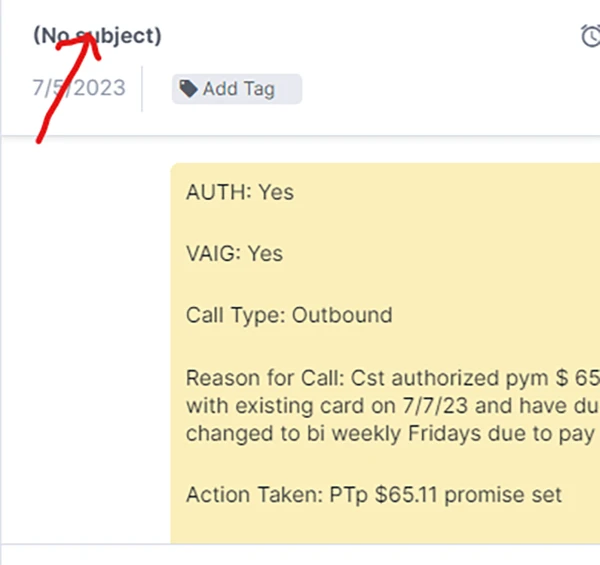
N.B – All escalations created must be titled accordingly in Kustomer and general notations should be title “Notes”

Siga las instrucciones para agregar o cambiar la tarjeta de crédito en su cuenta.
We are currently with vendors listed on our website Own.lease , once you are at checkout please select Own.Lease as
Contacte con nuestro equipo de atención al cliente.
Puede acceder a su documento de arrendamiento iniciando sesión en su cuenta haciendo clic en este enlace de inicio de sesión en la página de inicio de Own.lease
Own.Lease se compromete a brindar el mejor servicio posible a cada uno de nuestros clientes. Si no está satisfecho con...
Hay cuatro formas de contactarnos: teléfono, SMS, chat o correo electrónico. Contacta con nuestro equipo de atención al cliente.
El método de pago predeterminado para su contrato de arrendamiento es Pago automático con la tarjeta de crédito utilizada para configurar su
Gather detailed information by asking probing questions about why the customer believes this is a fraudulent account. Confirm customers Email
Frequency Change – Bi-Weekly/ Semi-Monthly/Monthly Payment Request Refund – This escalation should be vetted by Thia Dixon Cancel Lease Return
Notes Template Contact Type: Inbound / Outbound Reason for Interaction: Action Taken/Resolution: Escalation Completed: Yes / NA Agent Signature: